MealWise — AI Recipe Generator for iPhone
MealWise turns one message into a budget-friendly recipe. Tell it what you want, what you have, how many people you are cooking for, and what you want to spend.
Download on iOS No credit card required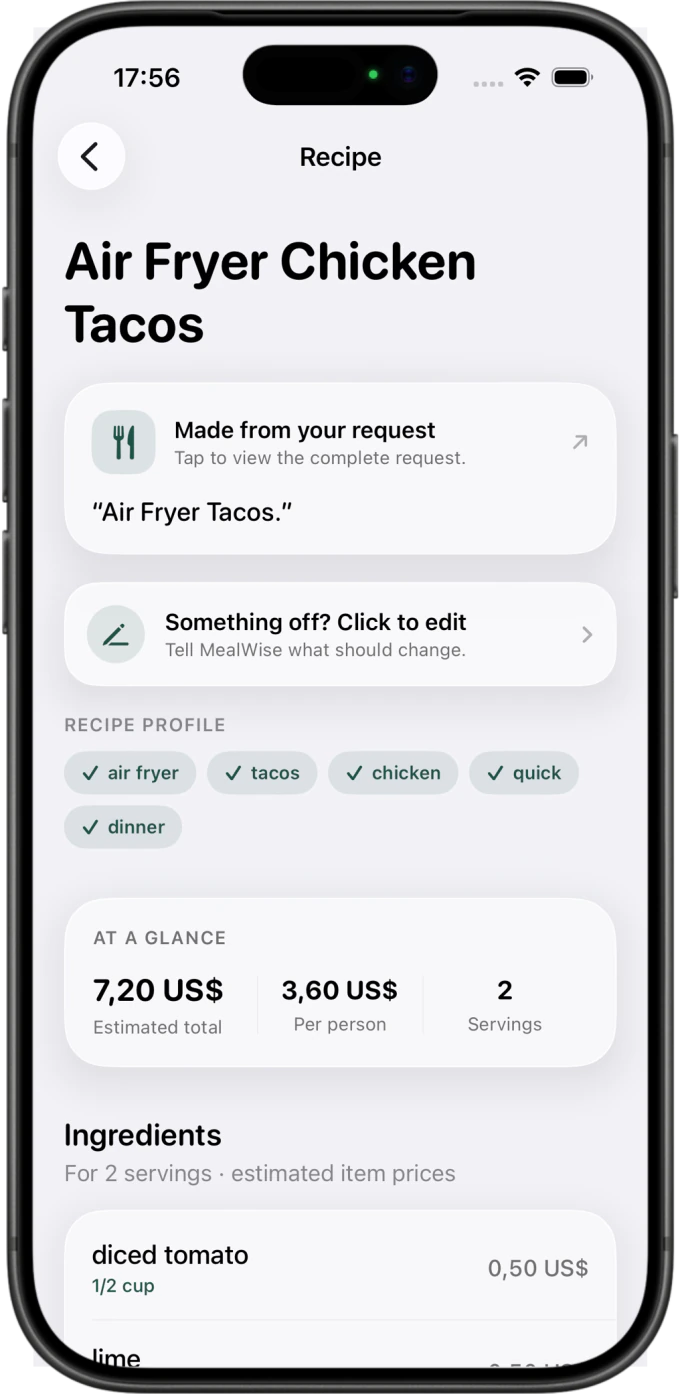
Recipe creation as easy as sending a message.
- 01
Describe your meal
Write or speak naturally. Add a budget, servings, diet, timing, ingredients—or none of them.
- 02
MealWise understands
Your request is translated into one structured recipe with realistic quantities and estimated costs.
- 03
Your recipe is ready
Cook from clear steps, save it locally, or use Pro to refine it and sync it across your devices.
From one idea to a recipe you can use.
Real MealWise screens—from the first request through price-aware recipe details.


Price information is an estimate. Check current labels, allergens and food safety before cooking.
Simple, but powerful 💪
MealWise handles the details without turning dinner into a form.
Natural recipe requests
Budget, diet, people and timing can live in one sentence.
Budget and serving estimates
Know what a recipe is likely to cost before you start cooking.
Use the rest of the chickpeas for tomorrow’s lunch.
Helpful recipe guidance
Every result includes clear steps and a genuinely useful tip.
Automatic dictation language
Speak naturally in the language that fits you.
Recipes saved on your iPhone
Local-first storage keeps your recipe library on your device.
Refine and regenerate with Pro
Change the meal without starting the entire request again.
Optional Pro cloud sync
Keep your recipe library available on every signed-in device when sync is enabled.

Home Screen widgets
See a saved recipe before you even open MealWise.

Lock Screen recipe glance
Keep the next meal a single glance away.
Your recipes stay on your iPhone
Every plan includes a local recipe library. Cloud sync is an optional Pro extra.
Built for real kitchens 👋
MealWise started with a simple frustration: finding one useful dinner should not mean opening ten ad-filled recipe pages or filling out a complicated form.
The goal is a calm recipe app that respects budgets, ingredients, time and privacy—while still feeling as natural as sending a message.
MealWise · Independent iOS app Listed on Needle Directory
Behind the scenes 👀
Follow the product thinking and learn how MealWise approaches useful AI recipes.
MealWise questions, answered.
The essentials about recipe generation, storage, pricing and safety.
What is MealWise?
MealWise is an iPhone recipe app that turns one natural-language description of a meal into a practical recipe with ingredients, portions, cooking steps and estimated costs.
How does MealWise generate a recipe?
You type or speak what you want to cook, including any budget, servings, ingredients, dietary preferences, exclusions, time or equipment. MealWise interprets those constraints and returns one structured recipe. Learn more
Can MealWise use ingredients I already have?
Yes. Name the ingredients you want to use and any ingredients you want to exclude. MealWise can combine those details with your serving, budget and time constraints. Learn more
Where are MealWise recipes stored?
Accepted recipes are saved locally on the iPhone by default. Optional cross-device cloud sync is a separate Pro feature when enabled by the user. Learn more
Can I change a generated recipe?
MealWise Pro can refine an existing recipe with a requested change or regenerate it as a meaningfully different alternative while keeping the original constraints. Learn more
Is MealWise free?
MealWise has a free plan with a monthly recipe-generation allowance. Optional Basic and Pro subscriptions add more capacity and paid features. Apple shows the current local price and billing terms before purchase. Learn more
Does MealWise show cost per serving?
MealWise can provide estimated ingredient and per-person costs so you can judge a recipe before shopping. Prices are estimates; check current labels and shelf prices. Learn more
Do I need an account to use MealWise?
The local recipe experience does not require an account. An account is only relevant when you choose optional Pro cloud sync. Learn more
What languages does MealWise support?
MealWise supports English, German, French, Spanish, Italian, Dutch, Japanese and Portuguese.
Are MealWise prices, allergens and cooking instructions guaranteed?
No. Ingredient prices are estimates, and AI-generated recipes can be incomplete or wrong. Always verify allergens, dietary suitability, food safety, cooking temperatures and current product labels yourself.
Start cooking with MealWise.
Tell us what sounds good. MealWise will take care of the recipe.
Download on iOS